
Response Handling
Overview
During development, Moneris provides simulator systems for testing your solution and ensuring your applications and systems are ready to handle transaction responses. Handling a response from the Moneris API involves confirming the status of the request itself and building logic within your solution for taking the next correct action. In some successful scenarios, this may involve using a value within the response body to inform the next appropriate transaction to perform; in failed transactions, this may involve incorporating documented errors to prevent transaction retries or prompt cardholders for alternate methods of payment.
Response Levels
In a typical transaction, communication flow passes through multiple systems. This diagram below provides an abstraction for understanding possible failure points in your transaction to aid in development and troubleshooting. We will use the term ‘Response Level’ for each zone in the diagram and discuss the problems possible for that interface.
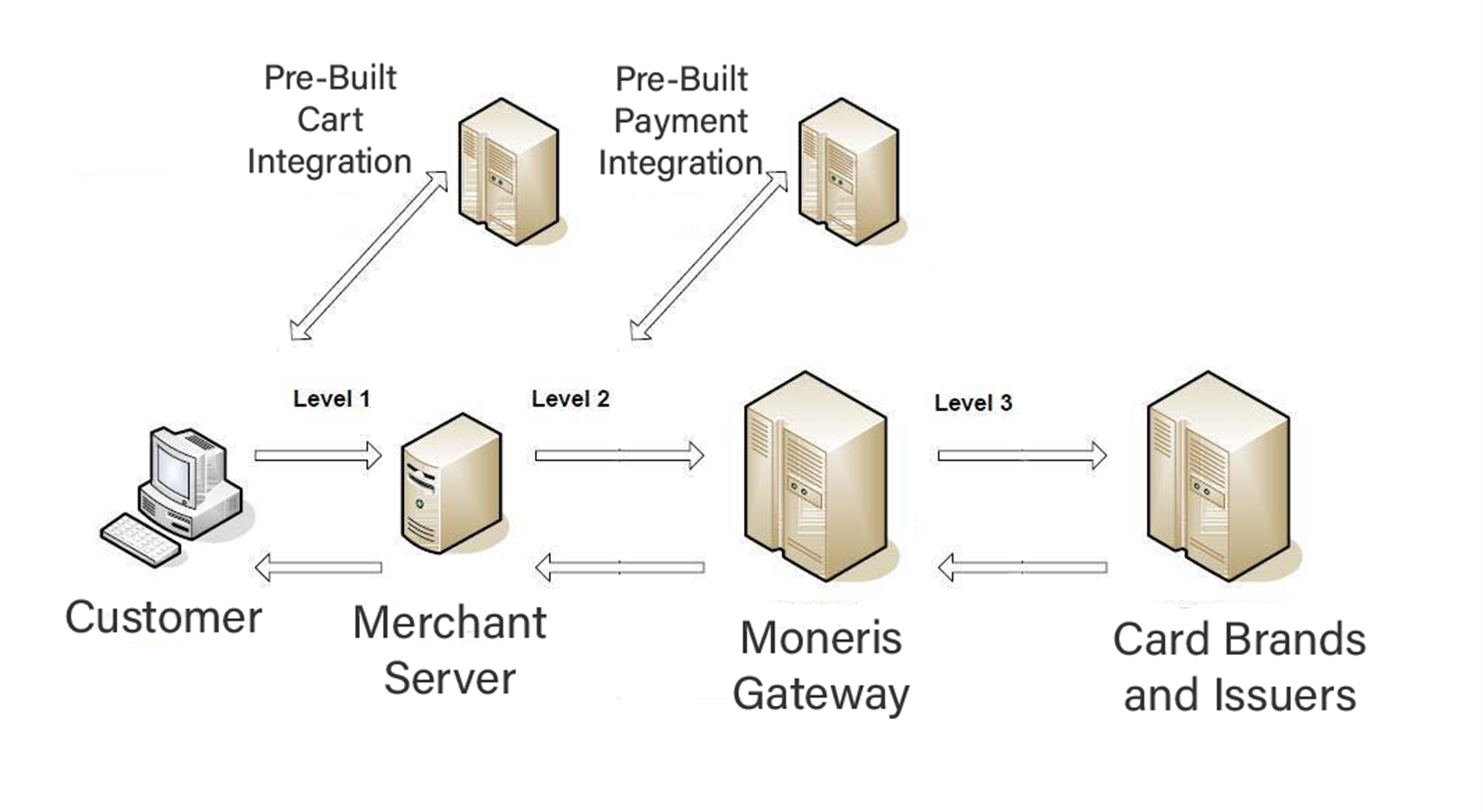
Third Party Systems as Level 0.5 or 1.5
Some merchant integrations may utilize a third-party vendor or ‘middleware’ provider that acts between levels in this diagram. They may appear either:
Between merchant server and Moneris, usually a as a pre-built payment integration
Between the cardholder and the merchant server (such as a pre-built shopping cart module for an eCommerce store). If your solution includes either of these, keep that additional layer in mind as part of your design for response handling.
Level 1: Cardholder to Merchant
Errors generated at this stage occur before a Moneris API request is sent and are specific to your merchant implementation. Errors may or may not be related to payment itself, depending on validation on data performed by your solution. Error messages generated at this level and the process to resolve them will be specific to each merchant’s system and outside the scope of this document, but we suggest that any error messages you produce are user-friendly to the cardholder.
Level 2: Merchant to Moneris Gateway
Errors generated at this stage involve your server sending a request message and receiving a response indicating failure or no response at all.
Failed Response
The nature of processing transactions includes possibility of format or content errors within your request message or communication errors downstream from our Moneris API endpoints which cannot be avoided. Therefore, your payment application must properly handle any resulting responses indicating an error.
The Moneris API makes use of standard HTTP Status Codes and a Problem JSON in every error response to assist with troubleshooting the nature of the error. Fields from the error response body can provide links to documentation on the error, details on the nature of this specific instance of the error, and enumerate related fields to the error.
{
"type": "https://developer.moneris.com/en/More/Testing/Response%20Codes",
"title": "FORBIDDEN_REQUEST",
"status": 403,
"detail": null,
"instance": null,
"category": "UNAUTHORIZED_ERROR",
"errors": [ ]
}Official HTTP status codes are defined via RFC standards and registered in the:
Main RFC standards are:
- RFC7231 - HTTP/1.1: Semantics (or RFC7235 - HTTP/1.1: Authentication)
- RFC 6585 - HTTP: Additional Status Codes
In addition, Moneris uses Problem JSON objects per RFC 7807 in error responses for client usage errors (4xx status codes) and server side processing errors (5xx status codes).
No Response / Timed Out
Failure to receive a response indicates a network connection problem between your merchant server and Moneris.
-
Confirm the URL you are using for the request is valid within our materials; typos in the domain can lead to time-out issues
-
Network issues with your internet provider or merchant server outside the scope of this documentation
Level 3: Moneris to Card Brands and Issuers
Some requests from the Moneris API can return successfully but require additional response handling beyond the HTTP status code itself. Commonly this involves particular fields within the response body that indicate the status of the entity itself or inform business decisions performed by your application. These elements are outside the scope of HTTP status itself, or represent microservices downstream in the payment flow returning their responses as part of the overall transaction.
Partial POST Create Payment
	"paymentStatus": "SUCCEEDED",
	"transactionDetails": {
	"transactionUniqueId": "string",
	"isoResponseCode": 1,
	"responseCode": 1,
	"message": "approved",
	"ecommerceIndicator": "AUTHENTICATED_ECOMMERCE"
},
For a basic example, we can look at the response for a Payment entity:
-
“paymentStatus” gives the current status of the the Payment. Possible states are listed in our API Reference, for instance:
-
“DECLINED _RETRY” advises to reattempt the payment transaction immediately
-
“DECLINED” advises that the transaction was rejected by our host, the card brand, or the issuing bank
-
“CANCELED” indicates the payment was voided via the POST Cancel Payment endpoint
-
“AUTHORIZED” is the state for a preauthorization payment prior to completing it with the POST Complete Payment endpoint
-
“SUCCEEDED” is the state of an approved payment, whether by the POST Complete Payment OR for a purchase via POST Create Payment with “automaticCapture” set to “true”
-
“PROCESSING” returns in any response from an ongoing asynchronous process.
-
-
“transactionDetails” holds useful information for troubleshooting declined transactions, such as the terminal “message” for the response, the “isoResponseCode” and the “responseCode” . These offer further context for issuer-based declines when investigating declined transactions
ISO and Host Response Codes
For the Payment endpoints, Moneris suggests using the possible values of “paymentStatus” as your common test scenarios. If you require the additional layer of transaction details, you can also replicate various host “responseCode” values via our Penny Value Simulator in the test environment. During testing, the cents value of your transaction ($1.xx) determines the success or failure of your payment. Consult the Penny Value table and the Host and ISO Response Code tables for more.
Receipt Handling
After handling the response itself, you may need to provide information taken from the response to form a receipt for the customer. Receipts involves card association rules that must be met in generating receipts for cardholders. This topic is explained in more detail in Receipt Handling.
HTTP Status Codes
Success Codes
Returned when the request is successfully received, understood, and accepted.
| Code | Meaning |
|---|---|
| 200 | OK - Standard success response |
| 201 | Created - Returned on successful entity creation. Returns either an empty response or the created resource. |
| 202 | Accepted - Our server accepted the request and may or may not succeed. Requires asynchronous processing. Moneris uses this status code for successful requests that may prompt additional activity outside for Moneris API by your server or a queued process within Moneris |
| 204 | No content - There is no response body. |
| 207 | Multi-Status - The response body contains multiple status information for different parts of a batch/bulk request |
Redirection Codes
Returned when your request fails and your client must take additional actions to complete the request.
| Code | Meaning |
|---|---|
| 301 | Moved Permanently - This and all future requests should be directed to the given URI. |
| 303 | See Other - The response to the request can be found under another URI using a GET method. |
| 304 | Not Modified - indicates that a conditional GET or HEAD request would have resulted in 200 response if it were not for the fact that the condition evaluated to false, i.e. resource has not been modified since the date or version passed via request headers If-Modified-Since or If-None-Match. |
Client-Side Error Codes
Returned when your request fails due to possible errors in the request message.
| Code | Meaning |
|---|---|
| 400 | Bad request - unspecific client error indicating that the server cannot process the request due to something that is perceived to be a client error (e.g. malformed request syntax, invalid request). Should also be delivered in case of input payload fails business logic / semantic validation (instead of using status code 422). |
| 401 | Unauthorized - unauthenticated credentials are not valid for the target resource |
| 403 | Forbidden - the user is not authorized to use this resource. |
| 404 | Not found - the resource is not found. |
| 405 | Method Not Allowed - the method is not supported, see OPTIONS. |
| 406 | Not Acceptable - resource can only generate content not acceptable according to the Accept headers sent in the request. |
| 408 | Request timeout - the server times out waiting for the resource. |
| 409 | Conflict - request cannot be completed due to conflict with the current state of the target resource. For instance, in situations where two clients try to create the same resource or if there are concurrent, conflicting updates. |
| 410 | Gone - resource does not exist any longer, e.g., when accessing a resource that has intentionally been deleted. |
| 412 | Precondition Failed - returned for conditional requests, e.g. If-Match if the condition failed. Used for optimistic locking. |
| 415 | Unsupported Media Type - e.g., clients send request body without content type. |
| 422 | Unprocessable Content - The syntax of the request content is correct, but the Moneris server was unable to process the contained instructions. Moneris uses 422 in scenarios where the request syntax is valid but the request failed business logic/rules validation. This includes most occurrences of decline from card associations and issuers. |
| 423 | Locked - Pessimistic locking, e.g., processing states. |
| 428 | Precondition Required - server requires the request to be conditional, e.g., to make sure that the "lost update problem" is avoided. |
| 429 | Too many requests - the client does not consider rate limiting and sent too many requests in a short span. |
Server-Side Error Codes
Returned when your request fails due to server-side issues or errors.
| Code | Meaning |
|---|---|
| 500 | Internal Server Error - a generic error indication for an unexpected server execution problem (here, client retry may be sensible) |
| 501 | Not Implemented - server cannot fulfill the request (usually implies future availability, e.g., new feature). |
| 503 | Service Unavailable - service is (temporarily) not available (e.g., if a required component or downstream service is not available) — client retry may be sensible. If possible, the service should indicate how long the client should wait by setting the Retry-After header. |
Updated 12 days ago